R5A (RK3588S) Quick Start
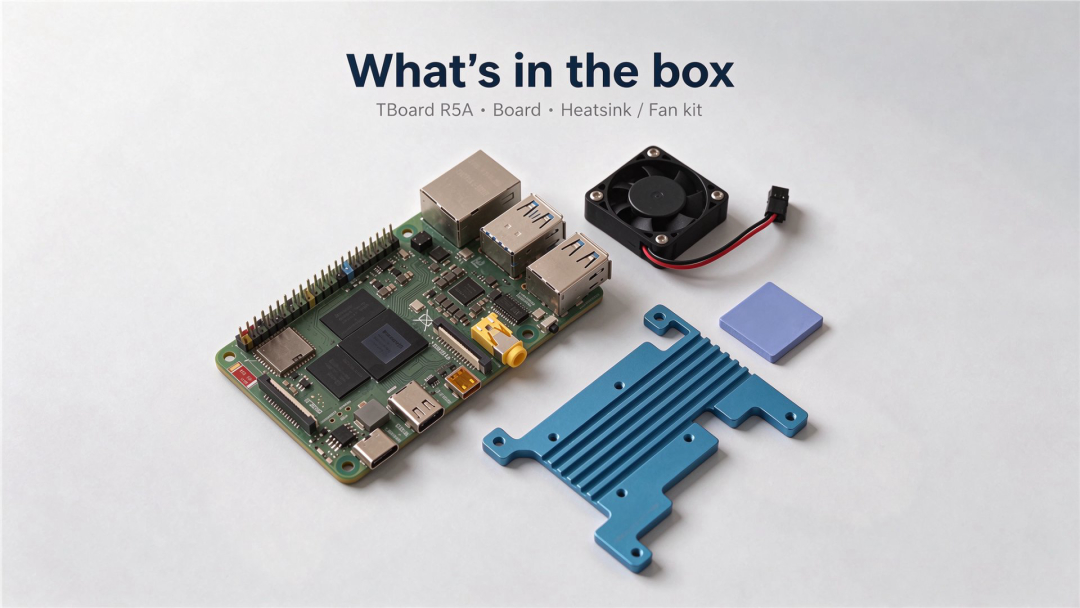
Take the TBoard R5A from box to first boot in four steps. The board runs on the Rockchip RK3588S (8-core CPU, Mali-G610 MP4 GPU, 6 TOPS NPU) — see the full specifications on the TBoard R5A page.
In the box
- TBoard R5A board
- Optional heatsink / fan kit (recommended for long-running workloads)
Image placeholder: 1200 × 675 px (suggested use: box contents photo). Replace it later with a verified image of the same dimensions.
You will also need: a 5 V / 3 A USB Type-C power adapter (board accepts 5–23 V), a microSD card (≥ 16 GB) or eMMC module, a Micro-HDMI cable, and optionally a 3.3 V USB-to-serial adapter for the debug console.
Four steps
- Assembly & Connections — mount cooling, connect display, network and power.
- Download Firmware — pick the right image for your R5A hardware revision.
- Flashing the Image — write it to microSD or eMMC.
- First Boot — log in via serial console or display.
Where to go next
- R5A 40-PIN Pinout and the Common module pages — use the interfaces.
- Basic Compilation — cross-compile your first program.
- TBoard R5A — full specifications.
Naming convention
This section is grouped by board, and every group label carries the SoC model:
R5A (RK3588S). To document a new board, add a sibling folder named
<board>-<soc> (lower case) under quick-start/, copy this folder's page set,
and give its _category_.json a label such as R5B (RK3576). That keeps
multi-platform boards one click away in the sidebar.